


Content Decay: Why Your Rankings Are Dropping (UAE)
- Manqoosh Seo
- July 16, 2026
- Blog
- 0 Comments
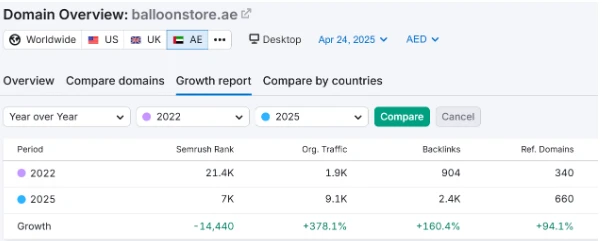
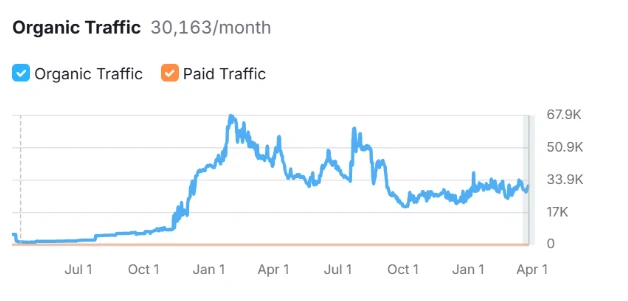
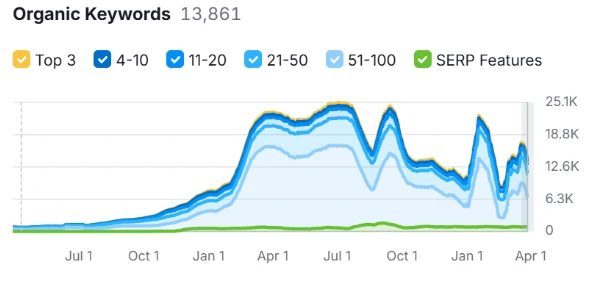
You published a blog post two years ago. It ranked on page one, brought in steady traffic, maybe even generated a few leads every month. Then, without any warning, the traffic graph started sliding down. No penalty notice. No algorithm update you can point to. Just a slow, quiet decline.
This is content decay, and it is one of the most overlooked reasons websites lose their organic visibility over time. Unlike a Google penalty, it does not announce itself. It creeps in month after month until a page that once performed well is barely showing up on page three.
If your rankings have been dropping and you cannot figure out why, content decay is worth investigating before you blame anything else.
Explore our best Search Engine Optimization Service in Dubai, UAE
What Is Content Decay?
Content decay refers to the gradual loss of organic traffic and search rankings for a page that once performed well, even though nothing was technically broken on the page itself. The content simply stopped being the best answer to the query it used to rank for.
Google is not static. It constantly reassesses which pages deserve to rank based on freshness, accuracy, user intent, and competition. A page that was the most helpful result in 2023 might be outdated, incomplete, or outranked by newer content in 2026. That gap between what your content offers and what searchers now expect is exactly where decay happens.
It is different from a manual penalty or an algorithm update hit. Those tend to cause sudden, sharp drops across many pages at once. Content decay is slower and usually affects individual pages or clusters of related content, one at a time.
7 Reasons Why Your Content Decay Happens
There is rarely a single cause. Most of the time, it is a combination of factors working against a page at once — which is exactly why content decay can be so hard to diagnose and reverse.
1. Outdated Information
Statistics, pricing, tools, regulations, and best practices change. A page referencing 2023 data in 2026 signals to both users and Google that it has not been maintained. This isn’t just a trust issue, it directly affects how useful the page actually is. Someone landing on outdated pricing or a deprecated tool recommendation will bounce immediately, and Google notices that behavior.
2. Search Intent Shifts
The way people search for something evolves. A query that once wanted a simple definition might now expect a comparison, a tool, or a video. If your content still answers the old intent, it loses relevance even if nothing on the page changed. Google is constantly re-evaluating what “satisfies” a query, and static content that doesn’t evolve with user expectations gets quietly passed over in favor of pages that match the new intent.
3. Increased Competition
New content is published every day. Your page does not need to get worse to lose rank; the competition just needs to get better. This shows up in a few specific ways:
- More comprehensive guides — Competitors publish longer, more thorough content covering angles your page never addressed.
- Better formatting — Tables, comparison charts, FAQs, and jump-links improve readability and dwell time.
- Fresh publish dates — Google often favors recently updated content for time-sensitive queries, even if the underlying information hasn’t changed much.
- Stronger E-E-A-T signals — Author bios, credentials, case studies, and original data build more trust than your page currently does.
- Multimedia additions — Videos, infographics, and interactive tools capture attention your text-only page can’t compete with.
4. Technical Erosion
Broken internal links, slow load times, missing images, or outdated plugins can quietly degrade a page’s performance without anyone noticing until traffic has already dropped.
Common culprits include:
- Broken internal or external links — Dead links hurt user experience and waste crawl budget.
- Slow page speed — Added scripts, heavier images, or bloated plugins over time slow load speed, hurting Core Web Vitals.
- Missing or broken images — Alt text and visual context disappear, weakening both UX and image search visibility.
- Outdated plugins or CMS versions — Security vulnerabilities and compatibility issues can cause rendering errors or indexing problems.
- Mobile rendering issues — Design changes elsewhere on the site can break how a specific page displays on mobile.
- Redirect chains — Multiple redirects stacked over time slow down crawling and dilute link equity.
5. Loss of Backlinks
Sometimes referring domains disappear, get de-indexed, or remove the link entirely. Losing backlink authority weakens a page’s ranking power over time.
This can happen because:
- Referring sites shut down or get de-indexed — The linking domain itself loses authority or disappears entirely.
- Content updates on the linking page — The site may have rewritten their article and dropped your link during an edit.
- Manual link removal — Some sites periodically “clean up” outbound links, and yours gets cut.
- Link rot from URL changes — If your own URL structure changed without proper redirects, external links now point to a dead page.
- Natural link decay — Backlinks naturally lose relevance and “freshness” value over time if not reinforced by new links.
6. Cannibalization From Your Own Content
If you have since published newer articles targeting the same or similar keywords, your pages may be competing against each other, diluting the ranking signals for both. Google struggles to decide which of your own pages is the “authoritative” one, sometimes causing both to rank lower than a single consolidated page would.
7. Declining Engagement Metrics
Rising bounce rates and falling time-on-page, often caused by intent mismatch or a cluttered user experience, are signals Google factors into how it ranks a page over time.
Key indicators to watch include:
- Fewer return visits — Repeat traffic drops off when content no longer feels fresh or authoritative.
- Rising bounce rate — Visitors leave quickly because the content doesn’t match what they expected.
- Falling average time-on-page — Shorter engagement suggests the content isn’t holding attention or answering the query fully.
- Declining scroll depth — Users aren’t making it past the first section, often due to poor structure or a weak hook.
- Lower click-through rate from search — A stale title or meta description no longer stands out in results.
Contact Manqoosh Marketing & Advertising Today For Consultation
How to Tell If a Page Is Decaying on Your Website
Before fixing anything, you need to confirm decay is actually the issue and not a broader technical or algorithmic problem.
- Pull up Google Search Console and filter by page. Look for pages with a steady, gradual decline in clicks and impressions over the last six to twelve months rather than a sudden cliff.
- Check average position for target keywords. A page slipping from position 4 to position 15 over several months is a strong decay signal.
- Compare your content against the current top ten results for your target keyword. If competitors have added sections, updated data, or improved formatting that you have not, that gap explains the drop.
- Review the publish or last-updated date. Pages older than 18 to 24 months without a refresh are the most common candidates for decay.
- Look at engagement metrics in your analytics tool. A rising bounce rate combined with falling rankings usually means the content no longer satisfies the intent it once did.
Not every drop is decay. Sudden, site-wide drops usually point to a technical issue, a manual action, or a core algorithm update, and those need a different diagnosis altogether.
8 Best Ways to Recover From Content Decay
Once you have identified which pages are affected, recovery is about targeted, deliberate updates rather than a full rewrite in most cases.
1. Audit Before You Edit
Do not touch the page yet. First, understand exactly why it lost ground by comparing it against current top-ranking competitors for the same keyword. Note what they cover that you do not, how they structure information, and what format they use, whether that is lists, tables, FAQs, or original data.
2. Update What’s Actually Outdated
Replace old statistics, screenshots, pricing, and examples with current ones. Search engines and readers both notice when a page still references information that is clearly a year or two behind.
3. Realign With Current Search Intent
Search a small sample of your target keywords yourself and study the results. If intent has shifted from informational to transactional, or from a simple answer to an in-depth comparison, restructure your content to match what searchers are actually looking for now.
4. Strengthen Depth and Coverage
Add sections that answer follow-up questions a reader would naturally have. This often means expanding on subtopics competitors are already covering, adding original examples, or including data your own business or case studies can support.
5. Fix the Technical Layer
Check for broken internal and outbound links, compress oversized images, confirm the page loads quickly on mobile, and make sure it is still properly linked from other relevant pages on your site. Small technical issues compound over time and are easy to miss.
6. Consolidate Competing Pages
If you find that multiple pages on your site are targeting the same keyword, merge the weaker one into the stronger page rather than letting them compete against each other. Redirect the old URL to preserve any link equity it built.
7. Rebuild Internal Links
Point relevant newer content back to the decaying page. Fresh internal links pass authority and signal to Google that the page is still an active, relevant part of your site.
8. Republish With a Genuine Update
Once meaningful changes are made, update the publish date and, where relevant, resubmit the URL through Google Search Console to prompt faster recrawling.
Preventing Content Decay Before It Starts
Recovery is reactive. A better long-term approach is building a content maintenance habit into your SEO process so decay never gets the chance to take hold.
- Schedule quarterly or biannual audits for your highest-value pages rather than waiting for traffic to drop before reviewing them.
- Track rankings and organic traffic per page consistently, not just at a domain level, so early declines get caught before they compound.
- Build an editorial calendar that includes refresh cycles alongside new content, since publishing new articles without maintaining old ones is how most sites end up with dozens of decaying pages at once.
- Keep an eye on your top competitors for your priority keywords so you notice when they raise the bar before your rankings slip.
- Treat cornerstone content, the pages that drive the most traffic or conversions, as living documents that get reviewed and improved regularly rather than one-time projects.
Content Decay Is a Maintenance Problem, Not a One-Time Fix
Rankings rarely drop for one dramatic reason. More often, it is dozens of small signals accumulating over months while nobody was watching that specific page. The good news is that content decay is one of the most fixable ranking problems out there, because the content, the backlinks, and the domain authority you already built are still there.
They just need to be realigned with what search engines and users expect today. The businesses that stay ahead of decay are the ones that treat their existing content library as an asset worth maintaining, not just archiving.
If auditing every page on your site and rebuilding a content strategy around it feels like more than your team has time for, that is exactly what our Content Optimization service is built to handle. We identify decaying pages, benchmark them against your real competitors, and rebuild them to recover lost rankings and traffic, so your existing content keeps earning its place on page one instead of quietly slipping away. Get in touch with our team at Manqoosh Marketing and let’s take a look at what your content is really doing for you right now.
Related Posts